

Build slides
Lines and polygons
Draw lines, arrows, connectors and free outlines with your own points, line ends and fills.
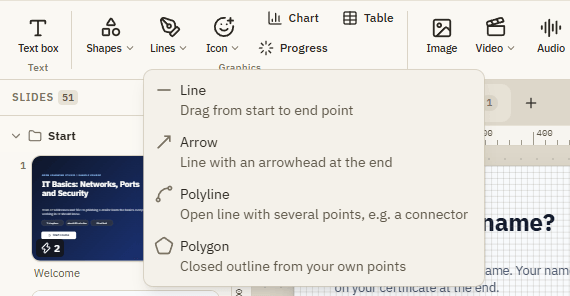
Lines and polygons are objects you draw point by point. Use them for arrows that point at something, connectors in a diagram, an outline around part of a picture or any free shape. There are four tools:
- Line: a straight line.
- Arrow: a line with an arrowhead at the end.
- Polyline: an open line with several points, for example a connector with corners.
- Polygon: a closed, filled shape from your own points.
Draw one in 3 steps
Pick a tool
Open Insert Lines and choose Line, Arrow, Polyline or Polygon.
Draw on the slide
For Line and Arrow: press on the slide at the start point and drag to the end point. For Polyline and Polygon: click once for every point.
Finish
A line is done when you let go. A polyline or polygon is done with a double-click, Enter or the Finish button. Cancel or Esc stops drawing.
Keys while drawing
| Key | What it does |
|---|---|
| Shift | Keeps lines at 45-degree steps (straight, diagonal). |
| Enter or double-click | Finishes a polyline or polygon. |
| Backspace | Removes the last point you set. |
| Esc | Cancels drawing. |
Change the points
Select the line or polygon. Its points appear on the slide.
| What you want | How |
|---|---|
| Move a point | Drag it, or select it and use the arrow keys. |
| Add a point | Click the small plus point between two points. |
| Remove a point | Double-click it, or select it and press Del. |
| Change direction or length of a line | Drag its start or end point. |
Format tab
| Setting | What it does |
|---|---|
| Start and End | The decoration at the first and last point: None, Arrow, Dot or Diamond. |
| Swap ends | Turns the line around: the start becomes the end. |
| Closed | Connects the last point with the first and fills the area. Switch it off for an open polyline. |
| Rounded | Round line ends and corners. |
| Appearance | Color, width and dashes of the line, and the fill of a closed polygon. |
Lines and polygons can also have states (for example red when the mouse is over them), animations, motion paths and triggers, like any other object.
If something doesn't work
| Problem | What to do |
|---|---|
| My polygon is not filled | Closed is off. Switch it on in the Format tab. |
| The arrowhead points the wrong way | Click Swap ends. |
| I keep adding points instead of finishing | Double-click the last point or press Enter. |
| The line jumps to odd angles | You are holding Shift, or Snap to grid is on. Switch it off in the bar below the slide. |